P45 Explained
Last reviewed: April 2026
Leaving a job? Your employer must give you a P45. Here is what every part means, what to hand to your new employer, and what to do if you have lost it.
At a glance
- ✓Your employer must issue a P45 on your last day or by the next pay date
- ✓Give Part 2 and Part 3 to your new employer to ensure the right tax code
- ✓Part 1A is your copy — keep it for your records
- ✓Without a P45 you will need to complete a Starter Checklist to avoid emergency tax
What is a P45?
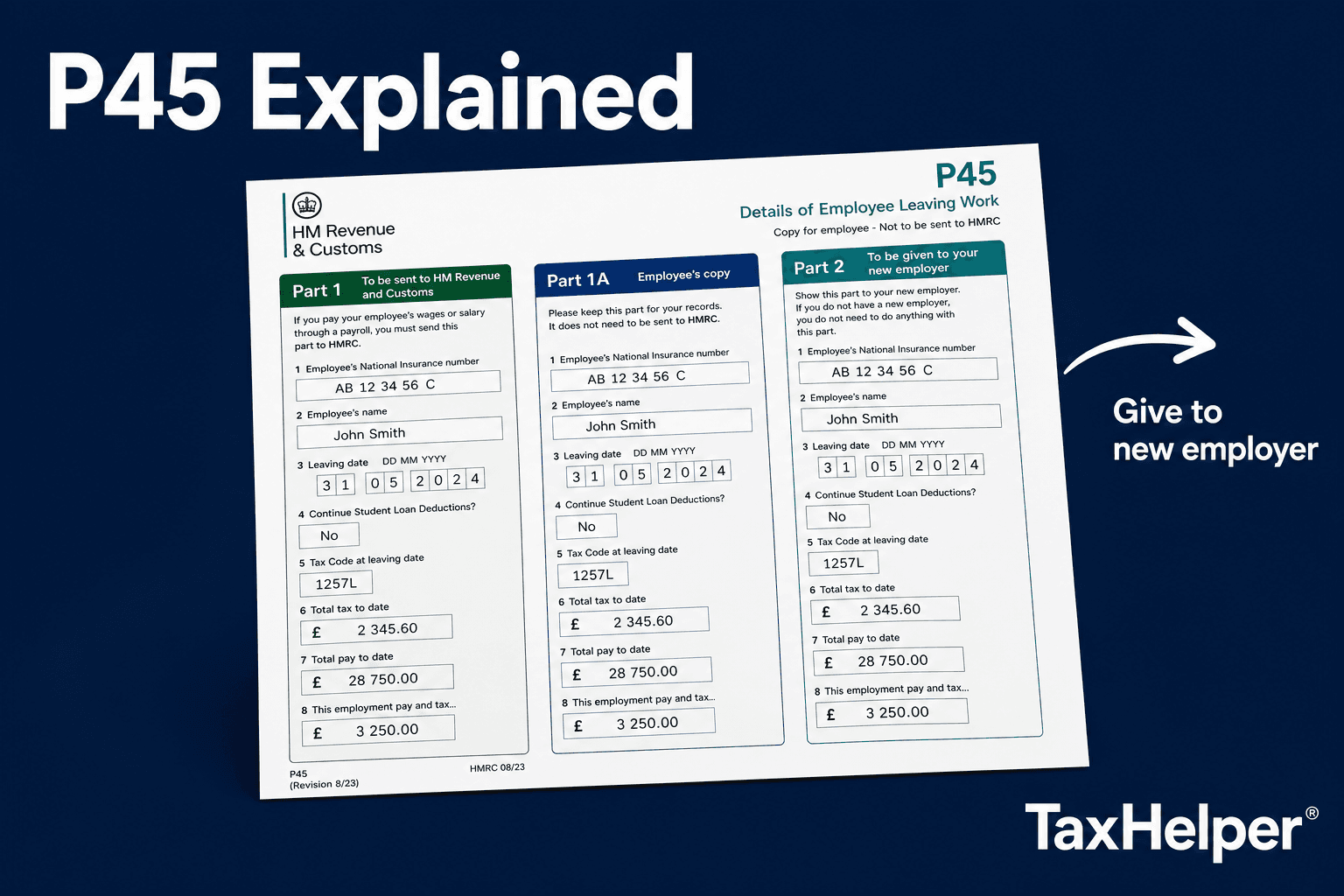
A P45 (officially "Details of employee leaving work") is a legal document your employer must give you when your employment ends — whether through resignation, redundancy, retirement or dismissal. The employer is required to issue it on or before your last day of work.
The P45 tells your next employer (or HMRC, or the benefits office) what you have earned and how much tax you have paid in the current tax year up to your leaving date. Without this information, your new employer cannot apply the right tax code and may deduct too much or too little tax.
Only one P45 per employment
You only get one P45 when you leave a job. If you lose it, you cannot get a duplicate. See below for what to do if it goes missing.
The four parts of a P45
Goes to: HMRC (via your employer)
Your employer sends this directly to HMRC to update your tax record. You never see it.
Goes to: You
Keep this copy for your records. It shows the same details as Part 1 — pay, tax and tax code to your leaving date.
Goes to: Your new employer
Give this to your new employer's HR or payroll team when you start. They use it to set your tax code.
Goes to: Your new employer
Also given to your new employer alongside Part 2. They tear off Part 3 and send it to HMRC after entering your details on their payroll.
What information is on a P45?
Tax year
The tax year the employment ended in (e.g. 2025 to 2026)
Your personal details
Name, address and National Insurance number
Employer details
Employer name, address and PAYE reference
Leaving date
Your last day of employment
Tax code on leaving
The tax code in use at the date you left
Total pay to date
Your cumulative gross earnings in this tax year up to your leaving date
Total tax to date
The total income tax deducted in this tax year up to your leaving date
Student loan deductions
If applicable, total student loan repayments made this tax year
Starting a new job without a P45
If you cannot provide a P45 — because you lost it, this is your first job, you have been self-employed, or you are starting work after a period on benefits — your new employer will ask you to complete a Starter Checklist (sometimes still called a P46).
The checklist asks you to tick which statement (A, B or C) applies to you. This determines your initial tax code:
This is your first job since leaving education — or you had no other income in the year before this job
Tax code: 1257L (cumulative)
This is your only job but you have had another job or received taxable state benefits since 6 April
Tax code: 1257L W1/M1 (emergency)
You have another job or receive a pension
Tax code: BR (basic rate, 20% on all earnings)
Choosing the wrong statement can cause over- or under-payment of tax. If in doubt, use our tax code checker after you receive your first payslip.
Frequently asked questions
What is a P45?
A P45 is a form your employer must give you when you stop working for them. It shows your tax code, your pay and the income tax deducted up to your leaving date. It has four parts: Part 1 goes to HMRC, and you get Parts 1A, 2 and 3.
What do I do with my P45?
Keep Part 1A for your records. Give Parts 2 and 3 to your new employer so they can apply the correct tax code from your first payslip. If you are claiming benefits, give Parts 2 and 3 to Jobcentre Plus instead.
What happens if I don't have a P45?
If you cannot provide a P45, your new employer will ask you to complete a Starter Checklist (formerly P46). Based on your answers, they will assign a temporary tax code. Without a P45, you may be put on an emergency tax code initially and overpay tax — but this is usually corrected in a subsequent payslip or via Self Assessment.
Can I get a replacement P45?
No — employers cannot issue a second P45. If you lose it, ask your previous employer for a statement of earnings, then complete a new employer's Starter Checklist. HMRC will correct any tax issues once they have details from both employers.
Sources
Not sure your tax code is right?
After starting a new job, check your first payslip with our tax code tool to confirm you are on the right code.